Documentation
Drying Machine Events Overview
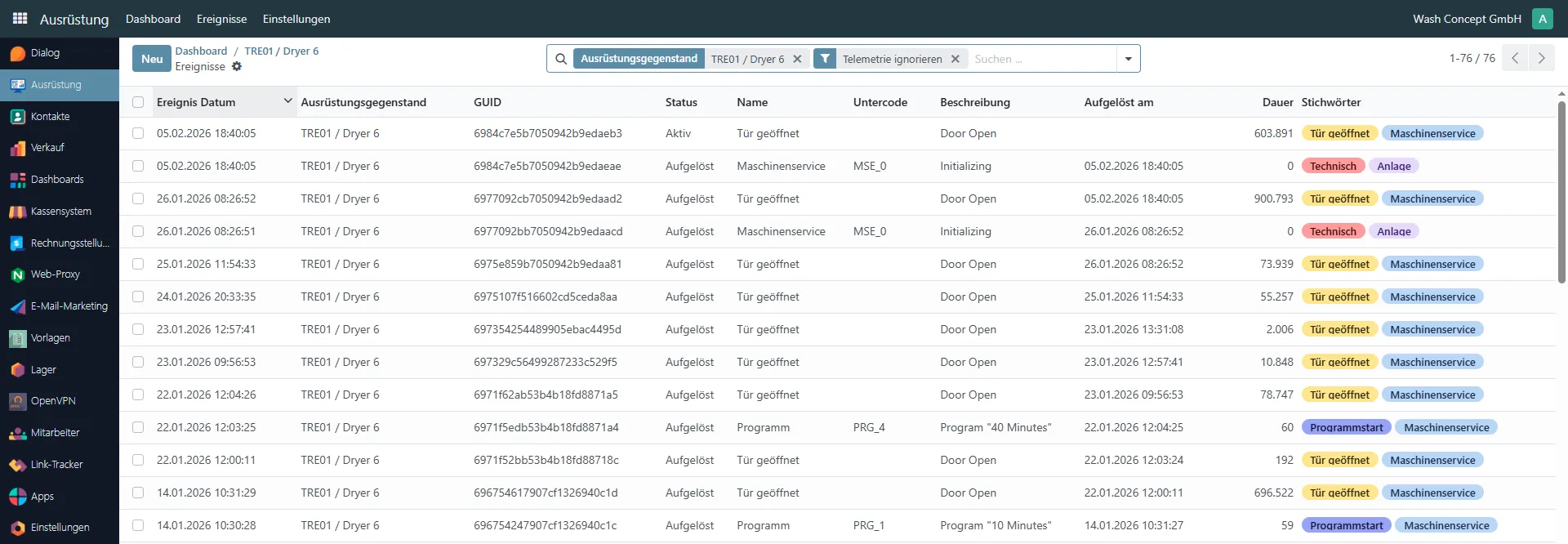
Section titled “Drying Machine Events Overview”This page provides a chronological overview of all events related to a specific drying machine. This page can be accessed from the machine confdryiguration page. It is intended for service engineers and support staff to monitor machine activity, analyze usage, and troubleshoot issues.
Purpose of the Page
Section titled “Purpose of the Page”The Events Overview allows you to:
- Track machine operations and user actions
- Analyze program usage and durations
- Identify service and technical events
- Review the latest machine status
- Investigate abnormal behavior or errors
Event List
Section titled “Event List”Each row in the table represents a single event generated by the drying machine or the backend system.
Columns Description
Section titled “Columns Description”- Event Date – Date and time when the event occurred.
- Equipment Item – The machine that generated the event.
- GUID – Unique identifier of the event record.
- Status – Current event state:
- Active – The event is currently ongoing.
- Resolved – The event has ended.
- Name – Event type (e.g. Door Opened, Program).
- Sub code – Internal event code or program identifier (e.g.
PRG_1). - Description – Human-readable event details (e.g. selected program name).
- Resolved At – Timestamp when the event was completed.
- Duration – Event duration in seconds.
- Tags – Event classification labels (e.g. Program Start, Door Opened, Machine Service, Technical).
Typical Events
Section titled “Typical Events”Common event types include:
- Program Start – Indicates that a drying program has been started.
- Door Opened – Shows when the machine door was opened.
- Machine Service – Service-related system events.
- Technical – Initialization or internal system events.
Usage Scenarios
Section titled “Usage Scenarios”This page is typically used to:
- Verify that programs are executed correctly
- Check how often and when machines are used
- Investigate user complaints or service tickets
- Analyze machine downtime and idle periods
Navigation
Section titled “Navigation”From this page, you can:
- Click on an event to open its detailed view
- Switch between different equipment items
- Navigate back to the drying machine or equipment overview pages