Documentation
Drying Machine Configuration
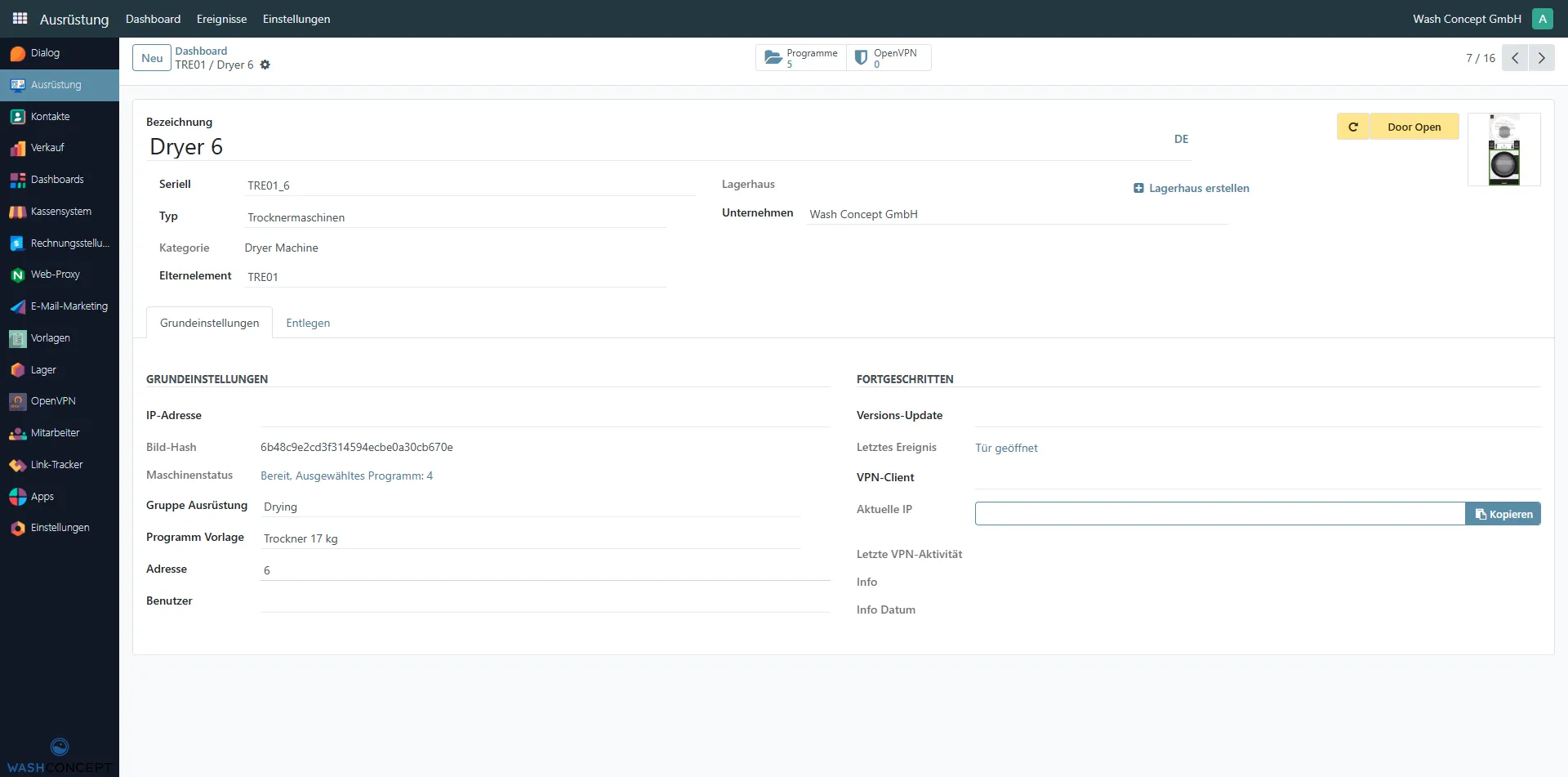
Section titled “Drying Machine Configuration”The Drying Machine Configuration page is used to view, configure, and monitor an individual drying machine managed by a vending unit.
It provides access to identification data, operational status, program assignment, and basic service actions.
You can access this page by selecting a drying machine from the Equipment Items list or from the Devices Page overview of a vending unit.
Page Purpose
Section titled “Page Purpose”This page allows service personnel and operators to:
- Identify the dryer machine within the system
- Assign and manage program templates
- Monitor the current machine state
- Perform basic service actions (e.g. door control)
- Review connectivity and diagnostic information
Header Information
Section titled “Header Information”The top section contains the main identification fields and quick actions:
- Name — drying machine name (e.g.
Dryer 6) - Serial — unique serial identifier (e.g.
TRE01_6) - Type — equipment type (e.g.
Dryer Machine). You can navigate to the equipment type directory and change the machine type - Category — equipment category
- Parent — Vending Unit that controls this machine (e.g.
TRE01). You can select the Vending Unit - Company — owning company (e.g.
Wash Concept GmbH) - Warehouse — Defines the physical or logical location of the machine
Header Actions
Section titled “Header Actions”- Status Indicator
- Displays Latest Event (is clicable - navigate to Machine Event List) and Refresh Latest Event button
- Machine Image
- Visual reference of the equipment
- Stop Program Button (if available)
- Stops current machine program
Navigation Tabs
Section titled “Navigation Tabs”The following tabs are available on the dryer configuration page:
- General — main configuration and status information
- Remote — remote access and connectivity options
General Section
Section titled “General Section”The General section contains core configuration parameters:
- IP Address — network address of the dryer controller
- Image Hash — identifier of the installed firmware or image
- Machine Status — current operational state
(e.g. Idle, Selected Program: 4) - Equipment Group — group assigned to the dryer
(e.g. Drying, which defines its position in the vending unit menu) - Programs Template — defines the default program configuration (Program Template) assigned to this dryer
(e.g. Dryer Programs 17Kg) - Address — internal device address or node number
- User — assigned system user (if applicable)
Advanced Section
Section titled “Advanced Section”The Advanced section provides diagnostic and connectivity information:
- Version Update — installed firmware version
- Last Event — most recent machine event
- VPN Client — VPN connection status
- Actual IP — current external IP address (with copy option)
- VPN Last Activity — last VPN communication timestamp
- Info / Info Date — additional system information and timestamps
This section is mainly used for troubleshooting and service diagnostics.
Program Management
Section titled “Program Management”At the top of the page, smart buttons provide quick access to related data:
- Programs — opens the list of programs available for this machine
- OpenVPN — opens VPN configuration and status information
Typical Usage Scenarios
Section titled “Typical Usage Scenarios”This page is commonly used to:
- Assign or verify the dryer program template
- Check whether the dryer is idle or in use
- Investigate door-related or service events
- Verify connectivity and VPN status
- Perform maintenance and service actions