Documentation
Devices Managenment
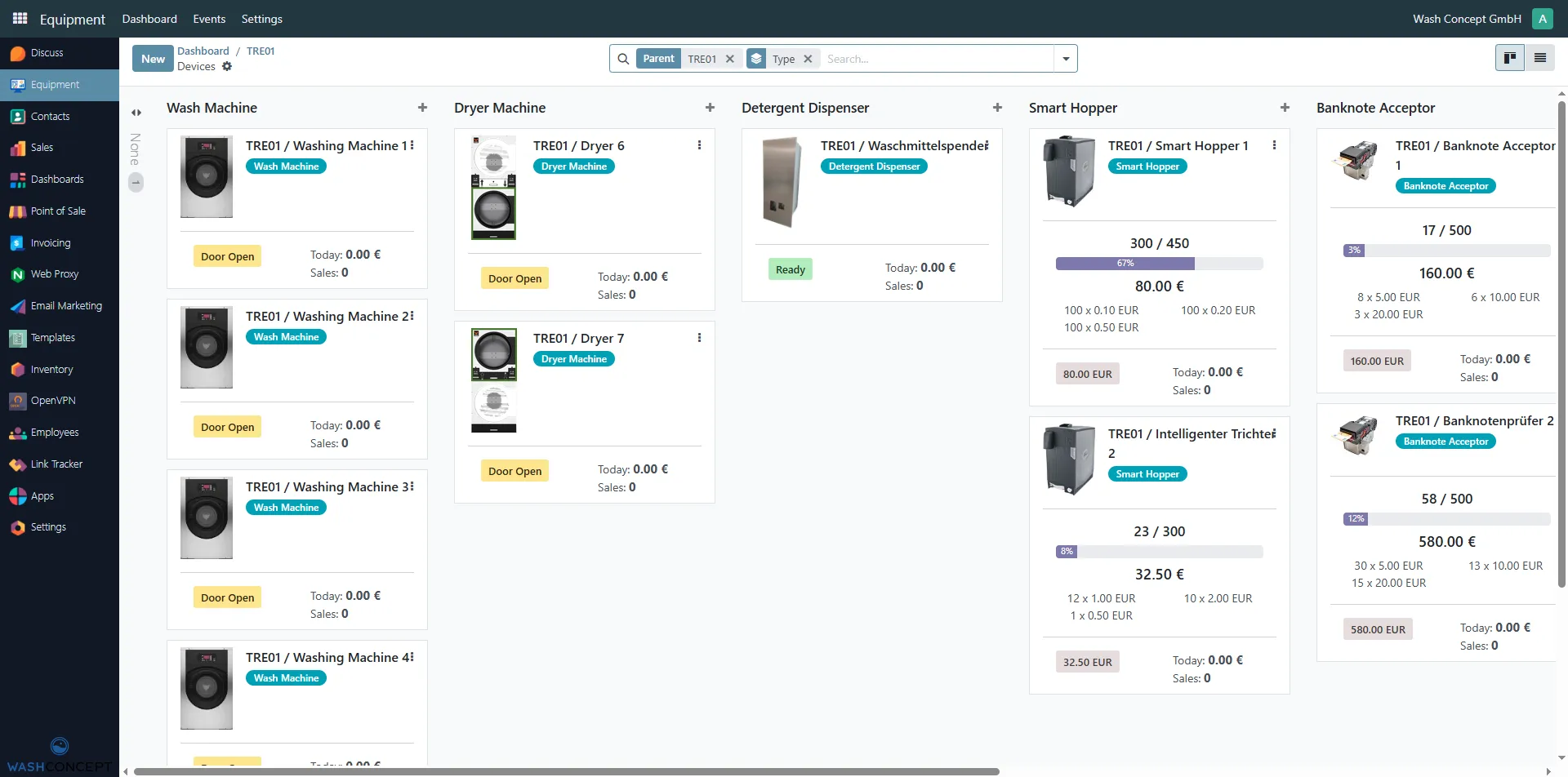
Section titled “Devices Managenment”The Devices page displays all devices managed by a specific Vending Unit.
This page provides an overview of the current status, availability, and sales information for each connected piece of equipment.
You can access this page by clicking the Devices button on the Vending Machine Configuration Page.
Page Purpose
Section titled “Page Purpose”The page is designed to:
- Show all equipment connected to a selected vending unit
- Group devices by equipment type
- Provide real-time status and sales indicators
- Allow quick navigation to individual device details
Equipment Categories
Section titled “Equipment Categories”All devices are grouped into logical sections based on their type:
- Washing Machines
- Drying Machines
- Detergent Dispensers
- Smart Hoppers
- Banknote Acceptors
- others
Each category is displayed as a separate column for easy monitoring.
Equipment Cards
Section titled “Equipment Cards”Each device is represented by a card containing key information.
Context Menu (⋮) Opens additional actions and configuration options for the selected equipment.
Common Information
Section titled “Common Information”Every equipment card includes:
- Device name (e.g.
TRE01 / Washing Machine 1) - Equipment type label
- Current status, such as:
ReadyDoor Open
- Today’s revenue (if available)
- Today’s sales count (if available)
Washing Machines and Dryers
Section titled “Washing Machines and Dryers”For washing and drying machines, the card shows:
- Device image
- Operational status (e.g. Ready, Door Open)
- Today:
- Total revenue
- Number of completed sales
These indicators help quickly identify machines that are active or require attention.
Detergent Dispensers
Section titled “Detergent Dispensers”Detergent dispenser cards display:
- Device status
- Today’s revenue
- Sales count
This allows operators to monitor usage and availability of detergents.
Smart Hoppers
Section titled “Smart Hoppers”Smart hopper cards provide extended financial and capacity details:
- Current fill level (e.g.
300 / 450) - Percentage indicator bar
- Total amount stored (e.g.
80.00 €) - Denomination breakdown (coins by value and quantity)
- Today’s revenue
- Sales count
This information is useful for cash level monitoring and refill planning.
Banknote Acceptors
Section titled “Banknote Acceptors”Banknote acceptor cards show:
- Current capacity usage (e.g.
17 / 500) - Total amount collected (e.g.
160.00 €) - Banknote denomination breakdown
- Today’s revenue
- Sales count
These details help track cash intake and optimize collection schedules.
Navigation and Filtering
Section titled “Navigation and Filtering”At the top of the page, filters and search tools are available to:
- Filter devices by Parent Vending Unit
- Filter by Equipment Type
- Quickly find a specific device