Documentation
Vending Machine Configuration
Section titled “Vending Machine Configuration”The Vending Machine Configuration page is used to view device details, monitor its current status, and perform remote management actions for a vending machine.
You can access this page from the Equipment section by selecting the required vending unit from the list.
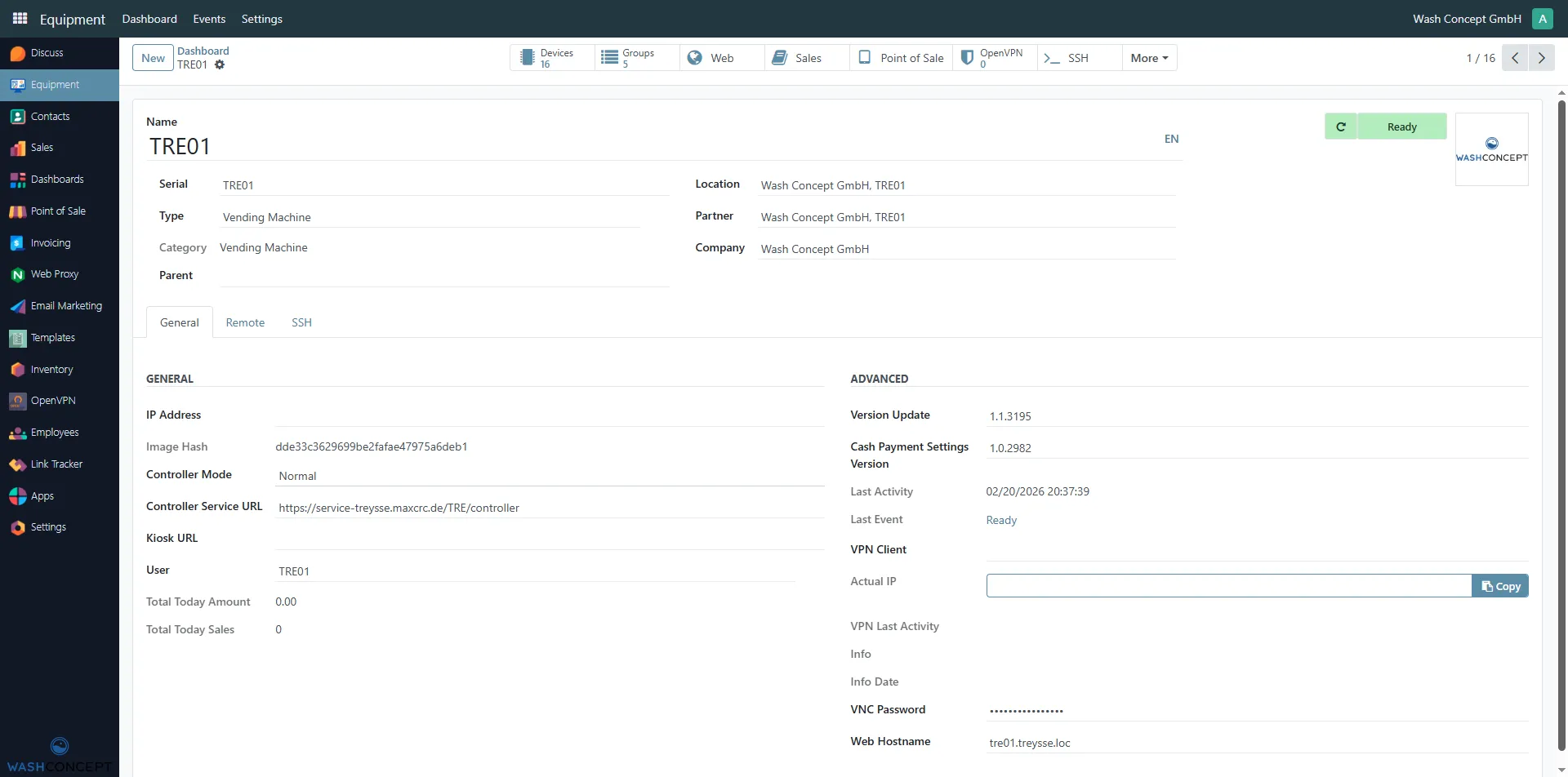
Top Action Panel
Section titled “Top Action Panel”At the top of the Vending Machine page (e.g. TRE01), there is a quick-access action panel. This panel provides navigation shortcuts to related operational areas of the selected machine.
These buttons allow fast access to configuration and monitoring views directly related to the current vending machine:
- Devices — displays all devices managed by a specific Vending Unit
- Groups — represents the Top Level Menu that end users see on the screen of the Vending Unit
- Sales — displays a list of all sales transactions generated by a specific Vending Unit.
General Information
Section titled “General Information”At the top of the page, the main information about the selected vending unit is displayed:
- Name — the name of the vending unit
- Serial — the device short number
- Type — equipment type (e.g.Vending Machine)
- Category — device category (view only)
- Location — installation location
- Partner — parent device, not used for Vending Machine
- Company — owning company
On the right side, the current device status is shown (for example, Ready). It’s clicable - navigate to Vending Machine Event List. There is also Refresh Latest Event button.
Navigation Tabs
Section titled “Navigation Tabs”Below the general information, the following tabs are available:
- General — main configuration parameters and status
- Remote — remote access options
- SSH — SSH actions and logs
General Section
Section titled “General Section”Network and Controller Settings
Section titled “Network and Controller Settings”This section displays key technical parameters of the vending unit:
- IP Address — current IP address of the device
- Image Hash — hash of the installed system image
- Controller Mode — controller operating mode
- Controller Service URL — URL of the controller service
- Kiosk URL — URL of the kiosk interface
- User — system user assigned to the device
Sales Information
Section titled “Sales Information”- Total Today Amount — total sales amount for the current day
- Total Today Sales — total number of sales for the current day
Advanced Section
Section titled “Advanced Section”The Advanced section provides extended device information:
- Version Update — installed firmware version
- Cash Payment Settings Version — version of cash payment configuration
- Last Activity — date and time of the last device activity
- Last Event — most recent device event
- VPN Client — VPN client status
- Actual IP — real IP address (with copy option)
- VNC Password — password for VNC access
- Web Hostname — hostname of the device web interface
Remote Access and Actions
Section titled “Remote Access and Actions”Additional actions are available via the More menu:
- Info — detailed device information
- VNC / VNC View — remote screen access to the device
- SSH Action — execute SSH commands on the device
- SSH Action Log — view SSH action history