Documentation
Events Overview
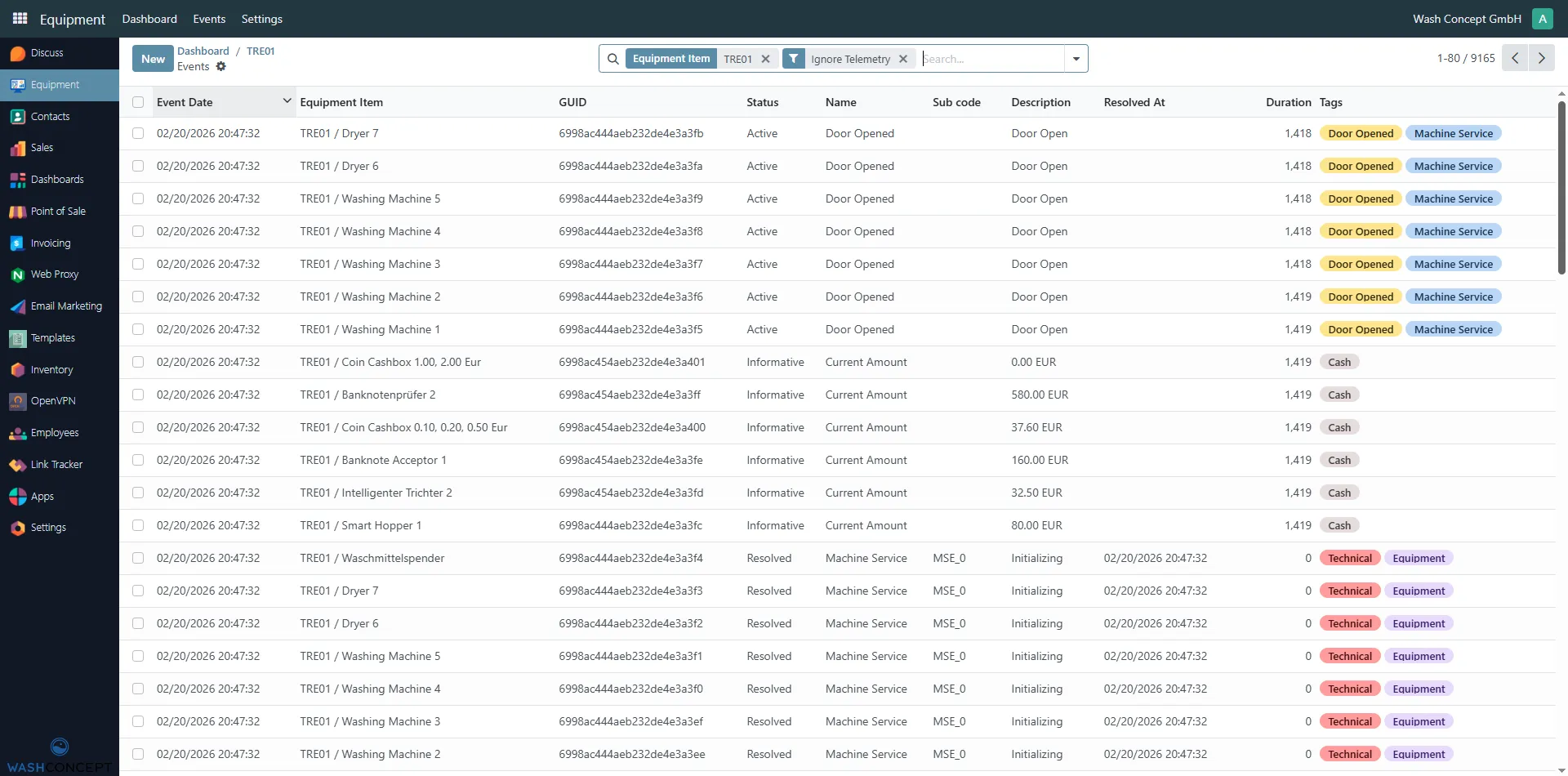
Section titled “Events Overview”The Vending Machine Events page provides a complete, chronological list of all events related to a specific Vending Machine. This includes events generated by the vending unit itself as well as events from all equipment managed by this vending machine (washing machines, dryers, payment devices, dispensers, etc.).
You can access this page by clicking the current event status button on the Vending Machine Configuration Page.
Page Purpose
Section titled “Page Purpose”This page is designed for monitoring, diagnostics, and troubleshooting. It allows operators and service personnel to:
- Monitor the current and historical state of the vending machine
- Track events from all connected equipment
- Identify active issues and unresolved events
- Analyze machine behavior and service activity over time
Event List
Section titled “Event List”Each row in the table represents a single event generated by the system.
Columns Description
Section titled “Columns Description”-
Event Date
Date and time when the event was created. -
Equipment Item
The source of the event:- The vending machine itself
- A managed device (e.g. washing machine, dryer, smart hopper, banknote acceptor)
-
GUID
Unique identifier of the event record. -
Status
Current state of the event:- Active — the event is currently ongoing
- Resolved — the event has been completed
- Informative — informational status update
-
Name
Event type (e.g. Door Opened, Machine Service, Ready, Printer). -
Sub code
Internal event or device code (e.g.PRG_1,MSE_0,PRN_9999). -
Description
Human-readable event details (e.g. Door Open, Initializing, Current Amount). -
Resolved At
Date and time when the event was resolved (if applicable). -
Duration
Duration of the event in seconds. -
Tags
Classification labels used to group and filter events, such as:- Door Opened
- Machine Service
- Technical
- Cash
- Equipment
- Ready
Event Types
Section titled “Event Types”Typical events visible on this page include:
-
Vending Machine Events
- Ready / Offline
- Printer or kiosk connection status
- Initialization and system events
-
Equipment Events
- Program start
- Door opened
- Machine service and initialization
- Cash level updates (coin cashboxes, hoppers, banknote acceptors)
Usage Scenarios
Section titled “Usage Scenarios”This page is commonly used to:
- Investigate current problems with the vending machine
- Identify which device caused an issue
- Analyze long-running or repeating events
- Verify correct operation after maintenance or configuration changes
- Review cash and payment-related status updates
Navigation
Section titled “Navigation”From this page, you can:
- Click on an event to open its detailed view
- Apply filters to focus on a specific device or issue
- Navigate back to the Vending Machine Configuration Page