Documentation
Groups Managenment
Section titled “Groups Managenment”The Machine Groups page represents the Top Level Menu that end users see on the screen of the Vending Unit.
At the same time, this page defines equipment groups used to logically organize all machines and devices connected to the vending unit.
You can access this page by clicking the Groups button on the Vending Machine Configuration Page.

Page Purpose
Section titled “Page Purpose”This page is used to:
- Define the top-level menu items visible to customers on the vending unit screen
- Organize equipment into logical groups
- Provide navigation to group-specific configuration pages
- Control how machines and services are presented to end users
Each tile on this page corresponds to a group of equipment.
Group Cards
Section titled “Group Cards”Each group is displayed as a card containing:
- Group name (e.g. Washing, Drying, Detergent)
- icon or image representing the group
- Group type or description (for example, Loyalty program)
These tiles define both:
- The menu structure for customers
- The equipment grouping logic for system configuration
Typical Groups
Section titled “Typical Groups”Typical groups include:
- Washing — washing machines
- Drying — dryer machines
- Detergent — detergent dispensers
- Top Up Card — loyalty and balance top-up services
- Buy Card — card purchase services
The actual set of groups depends on the vending unit configuration.
Relationship Between Groups and Equipment
Section titled “Relationship Between Groups and Equipment”Each machine or device belongs to one equipment group.
- The group for a specific device is selected on the device configuration page (for example, on the Washing Machine Configuration Page)
- Groups determine where and how the device appears in the vending unit menu
- Changing a group assignment affects the user-facing menu structure
Group Configuration
Section titled “Group Configuration”By clicking on a group card, you can:
- Open the equipment group configuration page
- Adjust group-specific settings
- Control visibility and behavior of the group in the vending unit interface
This allows flexible customization of both the technical setup and the customer experience.
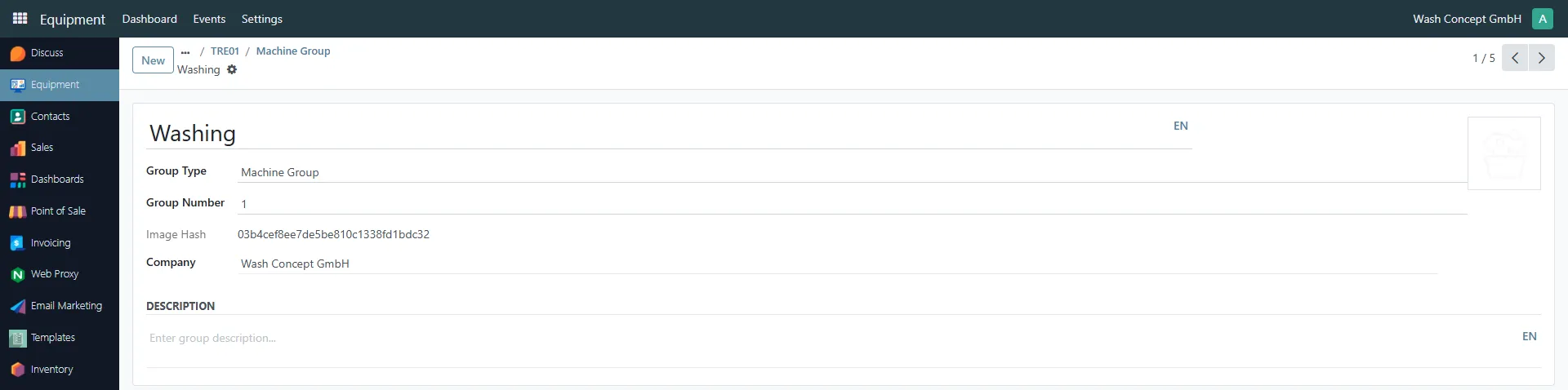
Equipment Group Details
Section titled “Equipment Group Details”The Equipment Group page is used to configure an individual group of equipment.
In this example, the page shows the Washing group, which represents a group of washing machines.
This page is opened by clicking a group card on the Machine Groups page.
Purpose of the Page
Section titled “Purpose of the Page”The Equipment Group page allows you to:
- Define how the group is displayed in the Vending Unit menu
- Control the order of the group in the top-level menu
- Provide descriptive information for operators and service personnel
All machines assigned to this group will inherit its menu position and presentation logic.
Fields
Section titled “Fields”Group Name
Section titled “Group Name”- Group Name (e.g. Washing)
- This name is used as the menu item title on the vending unit screen
- It is what the end user sees and selects when interacting with the vending machine
Changing this value immediately affects the customer-facing menu.
Group Number (Menu Order)
Section titled “Group Number (Menu Order)”- Group Number defines the position of the group in the top-level menu
- Groups are ordered by this number from lowest to highest
- This controls the visual order in which menu items appear on the vending unit
This allows operators to prioritize certain services, such as placing Washing before Drying.
Group Type
Section titled “Group Type”- Indicates the type of group (for example, Machine Group)
- Used internally to distinguish between different group categories and services
Description
Section titled “Description”- Optional group description
- Used for documentation and administrative purposes
- Does not affect the vending unit user interface directly