Documentation
Sales Orders Page
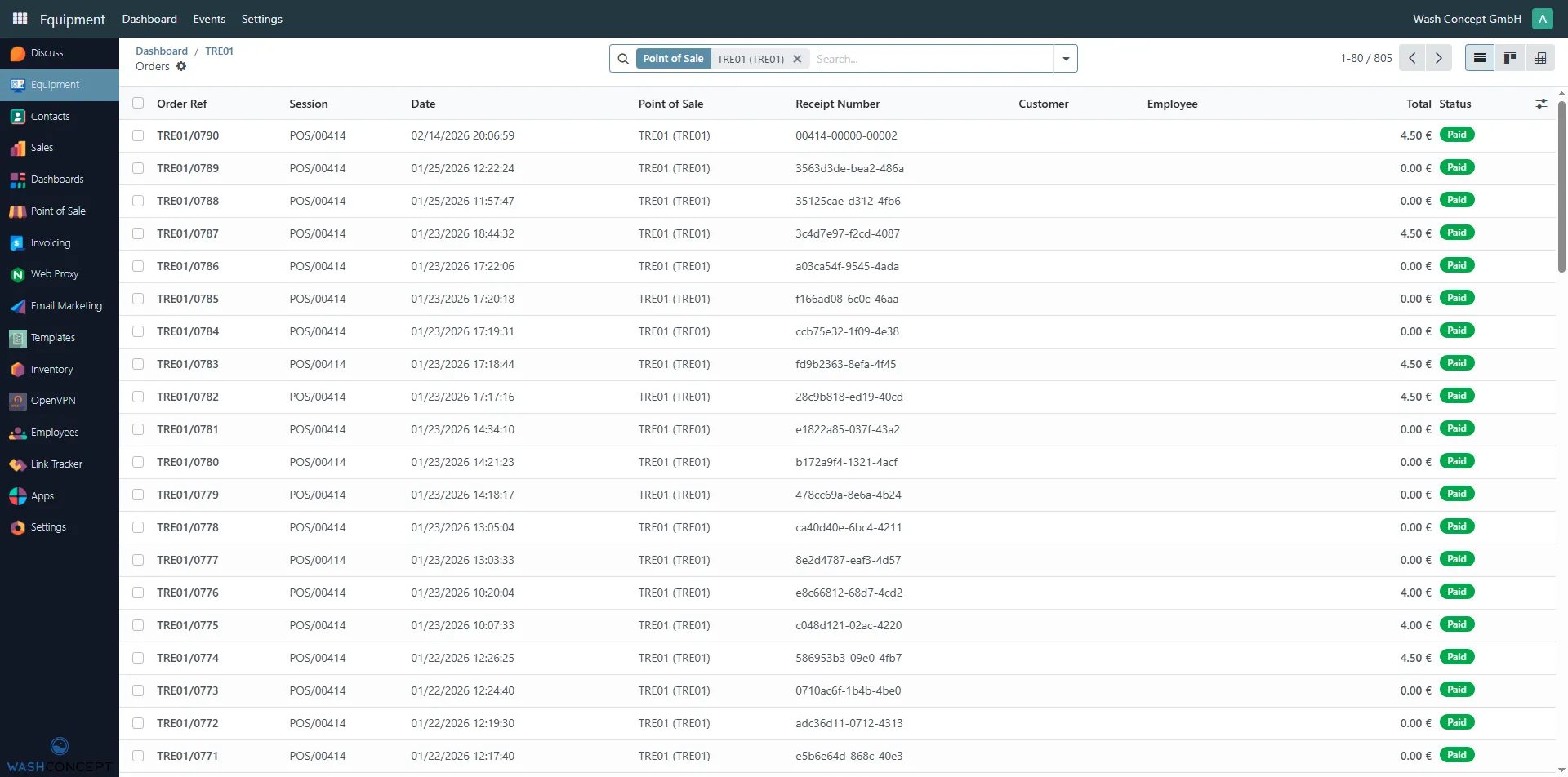
Section titled “Sales Orders Page”The Sales Orders page displays a list of all sales transactions (orders) and other service actions related to replenishing funds generated by a specific Vending Unit.
This page is used by operators, service staff, and administrators to review sales activity and verify completed payments.
You can access this page by clicking the Sales button on the Vending Machine Configuration Page.
Page Purpose
Section titled “Page Purpose”The Sales Orders page allows you to:
- View all sales (and other actions) associated with a specific vending machine
- Track completed transactions and payment status
- Review order totals and timestamps
- Investigate customer activity and sales history
Orders List
Section titled “Orders List”Each row in the table represents a single sales order created by the vending unit.
Columns Description
Section titled “Columns Description”- Order Ref – Unique order reference number.
- Session – Point of Sale session in which the order was created.
- Date – Date and time when the order was placed.
- Point of Sale – The vending unit that processed the transaction.
- Receipt Number – Unique receipt identifier generated for the order.
- Customer – Customer associated with the order (if available).
- Employee – Employee assigned to the order (if applicable).
- Total – Total order amount.
- Status – Current order status (e.g. Paid).
Filters and Search
Section titled “Filters and Search”At the top of the page, filtering tools are available:
- Point of Sale filter – Limits the list to orders created by the selected vending unit.
- Search field – Allows searching by order reference, receipt number, or other fields.
These tools help quickly locate specific transactions or time periods.
Order Status
Section titled “Order Status”Typical order statuses include:
- Paid – The order has been successfully paid and completed.
- Other statuses may be available depending on system configuration.
Usage Scenarios
Section titled “Usage Scenarios”This page is commonly used to:
- Verify that customer payments were processed correctly
- Review daily or historical sales data
- Investigate discrepancies or customer complaints
- Support accounting and reporting tasks
Navigation
Section titled “Navigation”From this page, you can:
- Click on an order to open its detailed view
- Navigate back to the vending unit configuration page
- Apply filters to focus on specific sales data
Sales Order Details
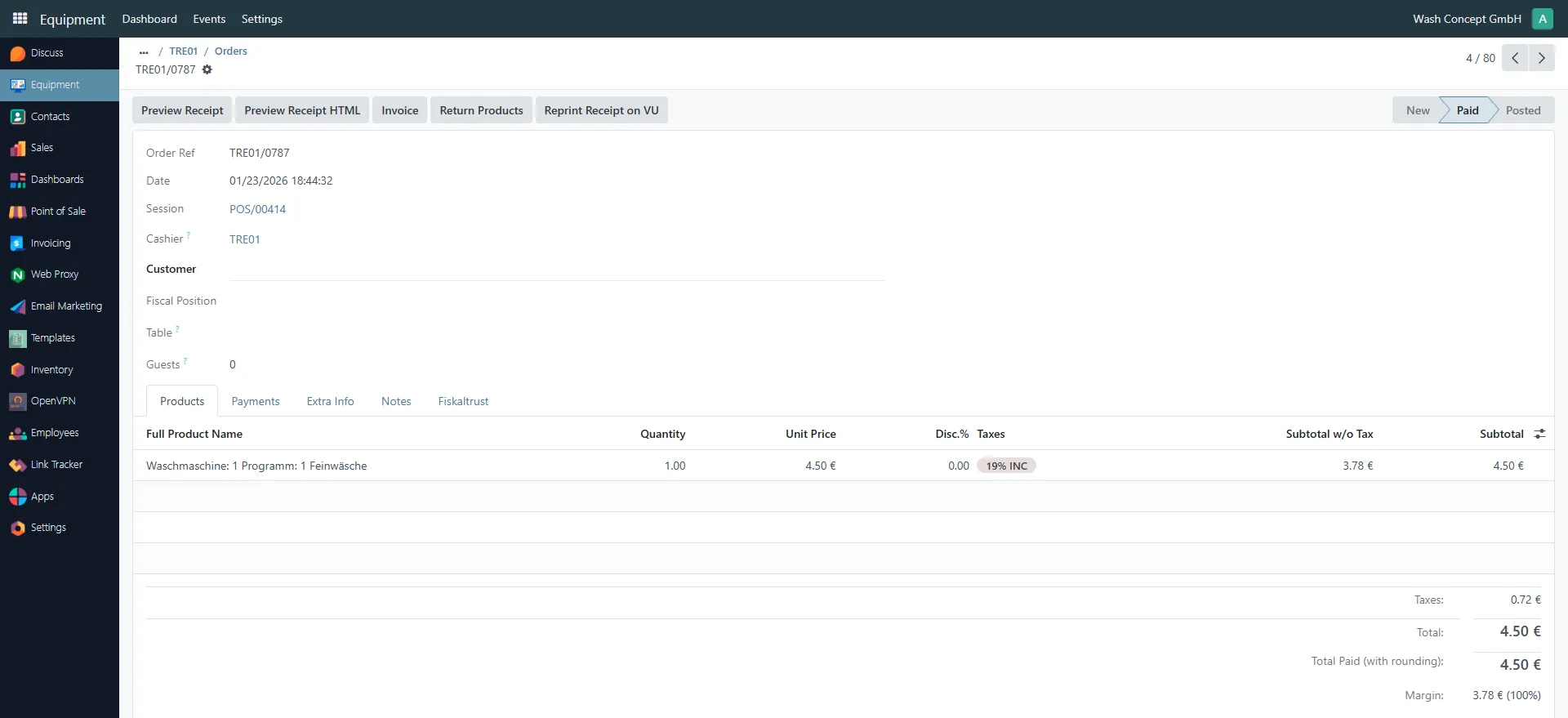
Section titled “Sales Order Details”The Sales Order Details page displays complete information about a single sales transaction created by the vending unit.
You can access this page by clicking on an order row in the Sales Orders list.
This page is mainly used for transaction verification, customer support, and accounting review.
Order Header Information
Section titled “Order Header Information”The upper section of the page contains general order metadata:
- Order Ref — unique order reference (e.g.
TRE01/0787) - Date — date and time when the order was created
- Session — Point of Sale session identifier
- Cashier — vending unit or POS device that processed the order
- Customer — customer record (if assigned)
- Guests — number of guests (usually
0for vending units)
The order status is displayed in the top-right corner (e.g. Paid, Posted).
Available Actions
Section titled “Available Actions”The following actions are available at the top of the page:
- Preview Receipt — opens a standard receipt preview
- Preview Receipt HTML — opens the receipt in HTML format
- Invoice — generates or opens the related invoice
- Return Products — initiates a refund or product return workflow
These actions are typically used by administrators or accounting staff.
Products Tab
Section titled “Products Tab”The Products tab lists all items included in the order.
For each product, the following details are shown:
- Full Product Name — includes machine and program information
(e.g. Washing Machine 1 – Program: Delicate Laundry) - Quantity — number of items sold
- Unit Price — price per item
- Discount — applied discount, if any
- Taxes — applied tax rate
- Subtotal (without tax)
- Subtotal (with tax)
Payment and Additional Information Tabs
Section titled “Payment and Additional Information Tabs”Additional tabs provide extended details:
- Payments — payment methods and payment amounts
- Extra Info — technical or system-related metadata
- Notes — internal notes related to the order
- Fiskaltrust — fiscalization data (if enabled)
Order Totals
Section titled “Order Totals”At the bottom-right of the page, a financial summary is displayed:
- Taxes — total tax amount
- Total — total order amount
- Total Paid (with rounding) — final paid amount
- Margin — internal margin calculation
Usage Scenarios
Section titled “Usage Scenarios”This page is typically used to:
- Verify individual customer transactions
- Investigate disputes or complaints
- Review fiscal and tax data
- Support accounting and reporting processes
Navigation
Section titled “Navigation”From this page, you can:
- Navigate back to the Sales Orders list
- Open related receipts or invoices
- Perform refunds or corrections (if permitted)