Documentation
Banknote Acceptor Management
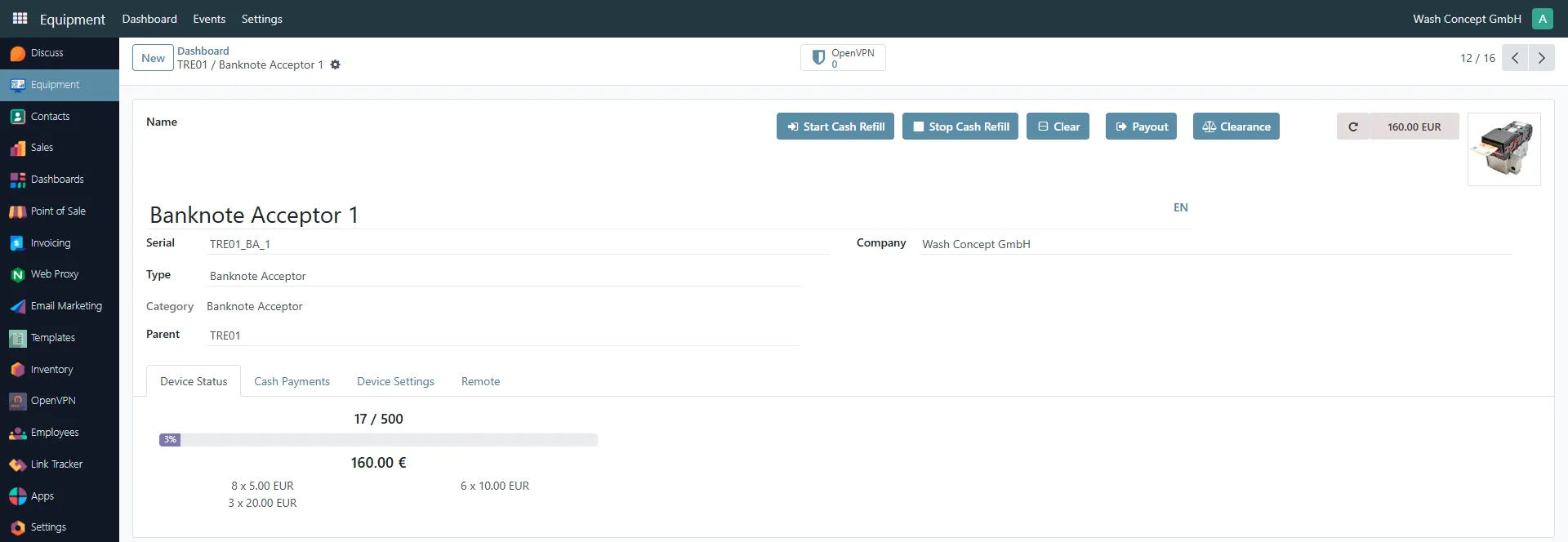
Section titled “Banknote Acceptor Management”The Banknote Acceptor Management page is used to monitor and manage a banknote acceptor device connected to a Vending Unit.
This page provides identification details, current cash levels, operational controls, and quick access to related configuration tabs.
You can access this page from the Equipment Items list or from the Devices Page overview of a vending unit.
Page Purpose
Section titled “Page Purpose”This page allows operators and service personnel to:
- Identify the banknote acceptor device
- Monitor current cash amount and capacity usage
- View denomination breakdown
- Perform operational actions (refill, payout, clearance, etc.)
- Access configuration and connectivity settings
Header Information
Section titled “Header Information”The upper section contains basic device information:
- Name — device name (e.g. Banknote Acceptor 1)
- Serial — unique serial number (e.g.
TRE01_BA_1) - Type — device type (Banknote Acceptor)
- Category — equipment category
- Parent — Vending Unit controlling this device (e.g.
TRE01) - Company — owning company
On the right side the last event of the device is displayed (e.g. 160.00 EUR means the amount of the last deposit/withdrawal, etc.). It`s clicable - navigate to Banknote Acceptor Event List. Here it is Refresh Latest Event button.
Device Status Overview
Section titled “Device Status Overview”The Device Status tab displays:
- Capacity indicator — visual progress bar
Example:17 / 500(3% usage) - Total stored amount — e.g.
160.00 € - Denomination breakdown, for example:
- 8 × 5.00 EUR
- 6 × 10.00 EUR
- 3 × 20.00 EUR
This section provides a real-time overview of the cash stored inside the banknote acceptor.
Action Buttons
Section titled “Action Buttons”The top-right section includes operational control buttons:
These buttons allow direct interaction with the physical device.
Detailed behavior of each button will be described in the following sections.
Navigation Tabs
Section titled “Navigation Tabs”The following tabs are available:
- Device Status — overview of stored banknotes and capacity
- Cash Payments — configuration of payout and limits
- Device Settings — device-specific configuration parameters
- Remote — remote access and connectivity settings
Each tab provides additional configuration and service options.
Cash Payments Tab
Section titled “Cash Payments Tab”The Cash Payments tab is used to configure how the Banknote Acceptor handles incoming and outgoing banknotes.
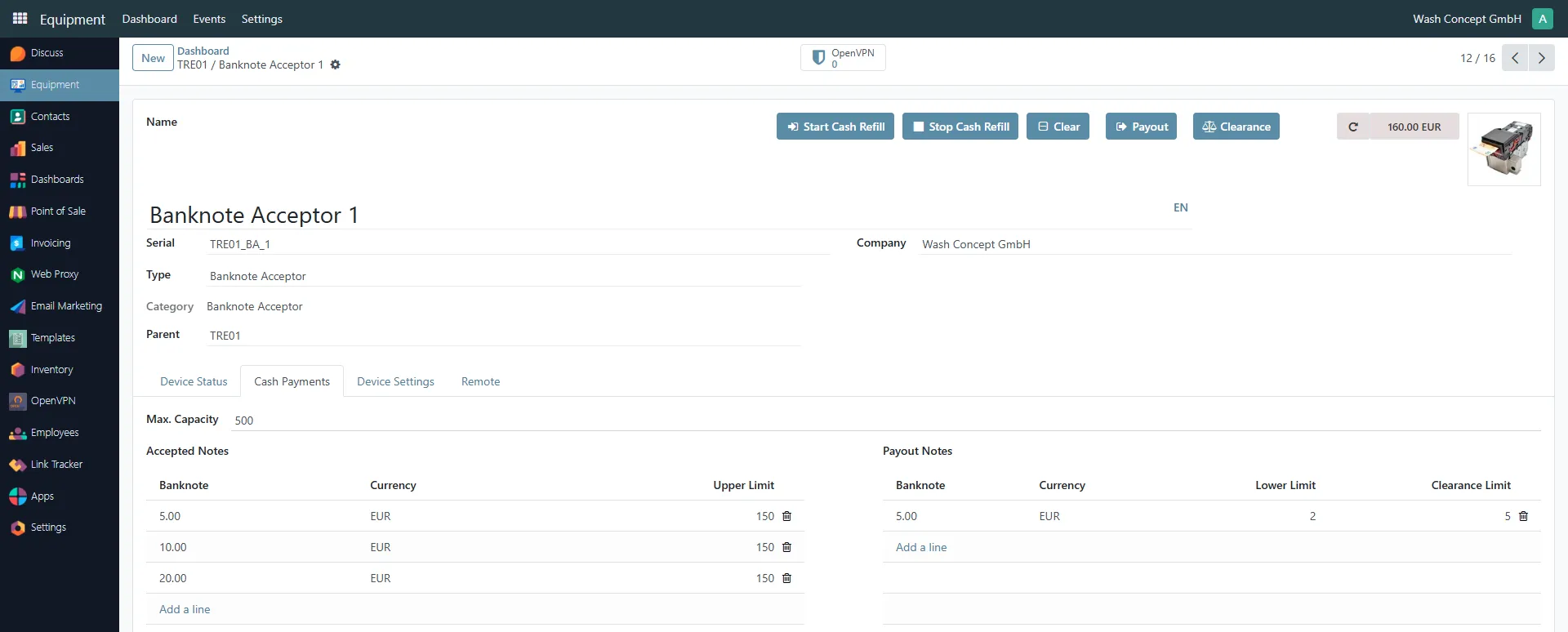
This section defines:
- Which banknotes are accepted
- Maximum allowed quantity per denomination
- Payout limits
- Clearance thresholds
Max. Capacity
Section titled “Max. Capacity”- Max. Capacity — maximum number of banknotes that can be stored in the device
Example:500
This value represents the total physical storage capacity of the acceptor.
Accepted Notes
Section titled “Accepted Notes”The Accepted Notes table defines which banknotes the device can receive and the maximum quantity allowed per denomination.
Columns:
Section titled “Columns:”- Banknote — denomination value (e.g. 5.00, 10.00, 20.00)
- Currency — currency code (e.g. EUR)
- Upper Limit — maximum number of notes of this denomination allowed in the device
Example:
| Banknote | Currency | Upper Limit |
|---|---|---|
| 5.00 | EUR | 150 |
| 10.00 | EUR | 150 |
| 20.00 | EUR | 150 |
If the number of stored notes reaches the Upper Limit, the device may stop accepting that denomination.
You can:
- Add new denominations using Add a line
- Remove a denomination using the delete icon
Payout Notes
Section titled “Payout Notes”The Payout Notes table defines rules for dispensing banknotes.
Columns:
Section titled “Columns:”- Banknote — denomination used for payout
- Currency — currency code
- Lower Limit — minimum number of notes to keep in the device
- Clearance Limit — threshold used by the Clearance function
Example:
| Banknote | Currency | Lower Limit | Clearance Limit |
|---|---|---|---|
| 5.00 | EUR | 0 | 0 |
Lower Limit
Section titled “Lower Limit”The Lower Limit defines the minimum number of notes that must remain in the device.
The system will avoid paying out below this threshold.
Clearance Limit
Section titled “Clearance Limit”The Clearance Limit is used by the Clearance button.
If the stored quantity exceeds this value, the excess notes can be moved to the cashbox during clearance.
Start Cash Refill Button
Section titled “Start Cash Refill Button”Click this button to start the service cash refill process for the banknote acceptor.
Stop Cash Refill Button
Section titled “Stop Cash Refill Button”Click this button to stop the service cash refill process for the banknote acceptor.
Clear Button
Section titled “Clear Button”Click this button to completely unload the contents of the banknote acceptor into the cashbox.
Payout Button
Section titled “Payout Button”The Payout button opens a dialog window that allows service personnel to manually dispense banknotes from the banknote acceptor.
This function is typically used during service operations to remove specific quantities of banknotes from the payout unit.
Payout Cash Dialog
Section titled “Payout Cash Dialog”After clicking Payout, a modal window titled Payout Cash appears.
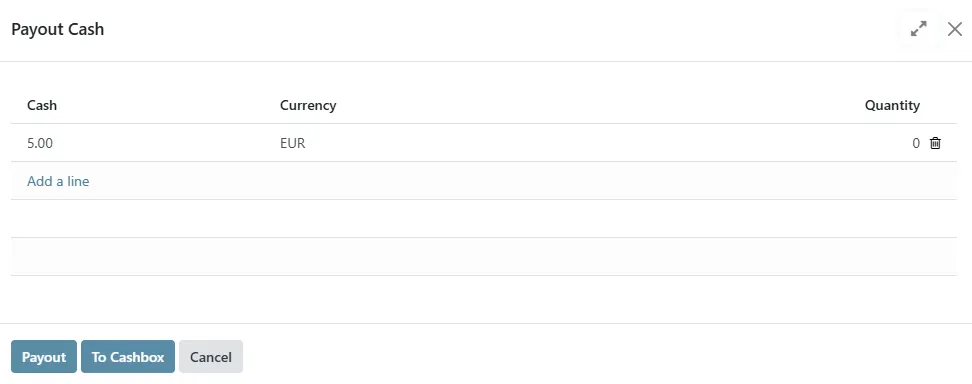
The dialog contains the following columns:
- Cash — banknote denomination (e.g. 5.00 EUR)
- Currency — currency type (e.g. EUR)
- Quantity — number of banknotes to be dispensed
You can:
- Enter the quantity of banknotes to dispense for each denomination
- Add additional payout lines using Add a line
- Remove a line using the trash icon
Action Buttons
Section titled “Action Buttons”At the bottom of the dialog:
- Payout — confirms and executes the payout operation
- To Cashbox — transfers the selected amount to the cashbox (if supported by the hardware configuration)
- Cancel — closes the dialog without performing any action
⚠ Use this function carefully. Payout operations immediately affect the physical cash inventory of the device.
Clearance Button
Section titled “Clearance Button”After clicking the Clearance button, a modal window titled Clearance is displayed.
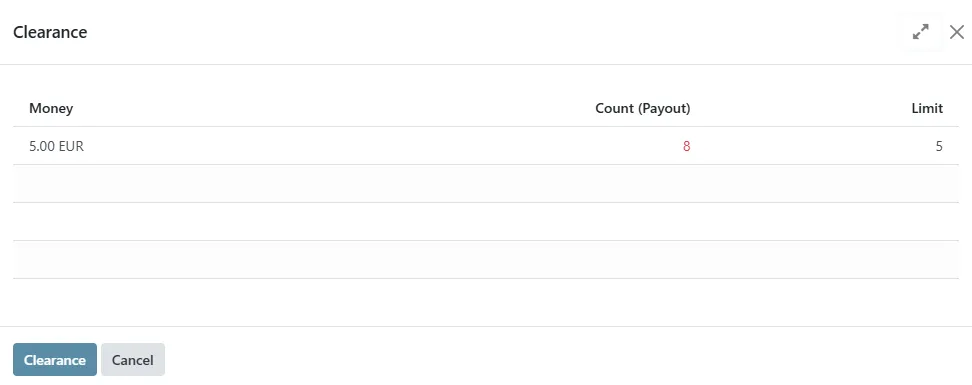
This dialog is used to automatically transfer only the excess banknotes (above the configured limits) from the payout unit to the cashbox.
The dialog contains the following columns:
- Money — banknote denomination (e.g. 5.00 EUR)
- Count (Payout) — current number of banknotes available in the payout unit
(values exceeding limits are highlighted) - Limit — configured clearance limit for the denomination
If the number of banknotes exceeds the defined Limit, the excess amount will be moved to the cashbox after confirmation.
Action Buttons
Section titled “Action Buttons”At the bottom of the dialog:
- Clearance — confirms and performs the clearance operation
- Cancel — closes the dialog without making changes
ℹ The Clearance operation does not empty the payout unit completely.
It only transfers the number of banknotes that exceeds the configured limit per denomination.