Documentation
Introduction
Section titled “Introduction”Equipment Items (Kanban View)
Section titled “Equipment Items (Kanban View)”The Equipment Items page provides a centralized overview of all machines and payment-related devices connected to the system. It is primarily used by service and maintenance staff to monitor operational status, program states, and cash balances. The page is implemented as a Kanban board, where equipment is grouped by type and displayed as individual cards.
Kanban Board Overview
Section titled “Kanban Board Overview”Each column on the Kanban board represents a specific equipment type.
Horizontal scrolling reveals additional equipment categories.
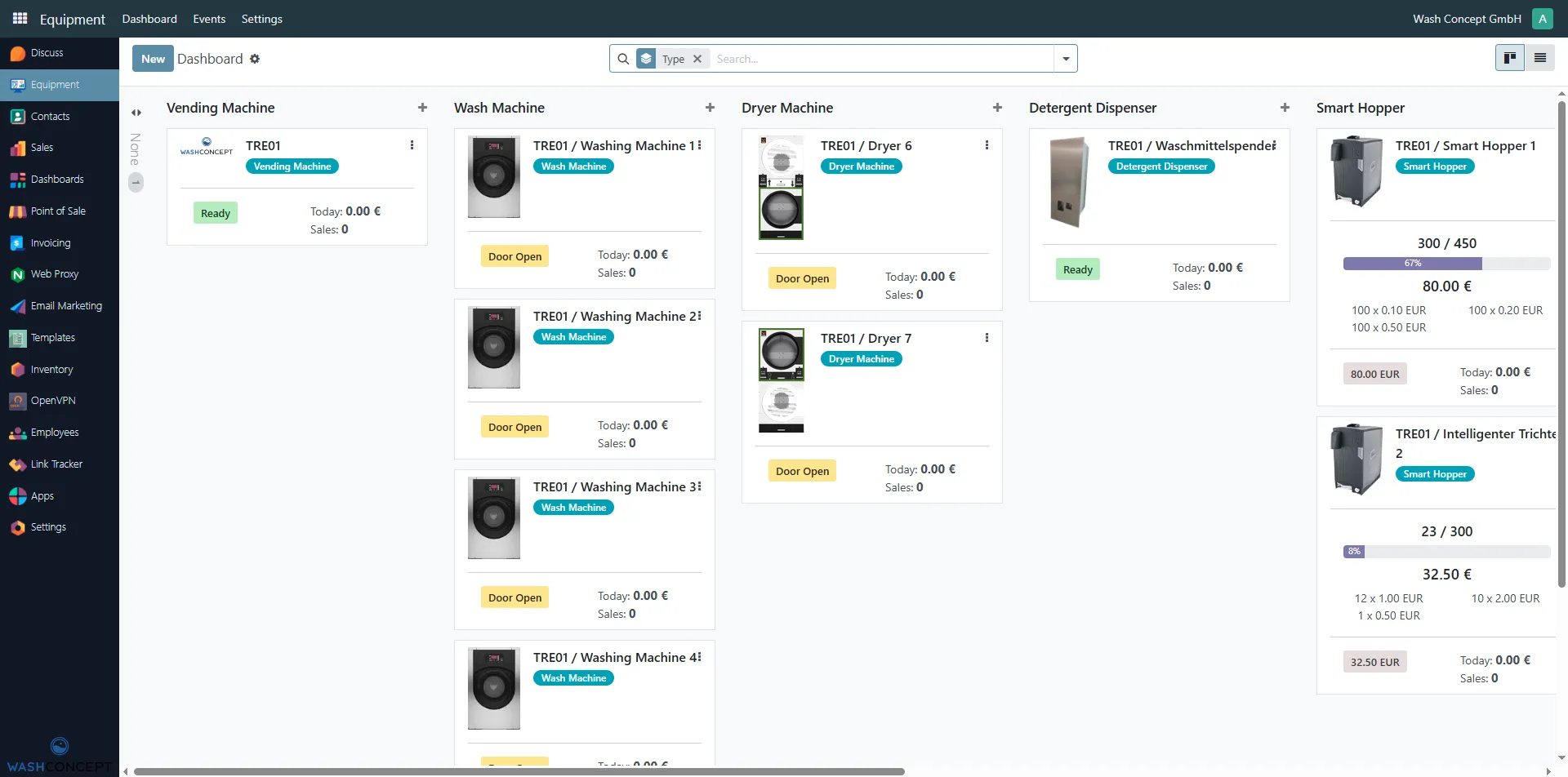
Main Equipment Types
Section titled “Main Equipment Types”Payment and Auxiliary Equipment
Section titled “Payment and Auxiliary Equipment”Equipment Card Structure
Section titled “Equipment Card Structure”Each equipment item is represented by a card containing operational and (or) financial information.
Common Elements
Section titled “Common Elements”-
Equipment Name
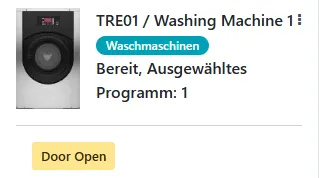
Example:TRE01 / Washing Machine 1 -
Equipment Type Badge
Colored label indicating the device type (e.g. Wash Machine, Coin Acceptor). -
Status or Balance Information
Depending on the equipment type. -
Context Menu (⋮)
Opens additional actions and configuration options.
Washing Machines
Section titled “Washing Machines”Wash machines display real-time information about washing programs and machine state.
Displayed Information
Section titled “Displayed Information”- Machine name
- Status text, for example:
Idle, Selected Program: 2Paid, Selected Program: 3Done, Selected Program: 4
Status Indicators
Section titled “Status Indicators”-
Ready (green label)
The machine is available for use. -
Door Open (yellow button)
Indicates that the door is currently open.
Operational Use
Section titled “Operational Use”Service staff use this view to:
- Check machine availability
- Identify completed or paid programs
- Verify door state during inspections
Dryer Machines
Section titled “Dryer Machines”Dryer machines follow the same layout and logic as wash machines.
Displayed Information
Section titled “Displayed Information”- Machine name
- Current state:
Idle, Selected Program: X
Actions
Section titled “Actions”- Door Open
Used for maintenance and inspection.
Vending Machines
Section titled “Vending Machines”Vending machines act as central payment and control units.
Displayed Information
Section titled “Displayed Information”- Machine name
- Daily Revenue
- Example:
Today: 5.00 €
- Example:
- Sales Count
- Example:
Sales: 2
- Example:
Status
Section titled “Status”- Ready
Indicates that the vending machine is operational.
Operational Use
Section titled “Operational Use”- Monitor daily turnover
- Verify that payment and control functions are active
Banknote Acceptors
Section titled “Banknote Acceptors”Banknote acceptors are used for cash payments via banknotes.
Displayed Information
Section titled “Displayed Information”-
Device name
Examples:TRE01 / Banknote Acceptor 1TRE01 / Banknotenprüfer 2
-
Current Balance
- Example:
0.00 EUR - Example:
550.00 EUR
- Example:
Operational Use
Section titled “Operational Use”- Monitor accumulated cash
- Plan cash collection
- Detect unusually high balances
Coin Acceptors
Section titled “Coin Acceptors”Coin acceptors handle coin-based payments.
Displayed Information
Section titled “Displayed Information”-
Device name
Example:TRE01 / Münzprüfer -
Current Balance
- Example:
0.00 EUR
- Example:
Operational Use
Section titled “Operational Use”- Verify coin intake
- Detect connectivity or reporting issues
Coin Cashbox
Section titled “Coin Cashbox”The Coin Cashbox represents the physical container where coins are collected.
Displayed Information
Section titled “Displayed Information”-
Cashbox name
Example:TRE01 / Münzkasse -
Current Balance
- Example:
44.50 EUR
- Example:
Operational Use
Section titled “Operational Use”- Track collected coins
- Plan and document cash removal
- Ensure correct linkage with coin acceptors
Smart Hopper
Section titled “Smart Hopper”Smart hoppers are intelligent devices used for coin storage and handling.
Displayed Information
Section titled “Displayed Information”-
Device name
Examples:TRE01 / Smart Hopper 1TRE01 / Intelligenter Trichter 2
-
Current Balance
- Example values:
26.20 EUR14.00 EUR
- Example values:
Operational Use
Section titled “Operational Use”- Monitor coin availability
- Ensure correct operation of advanced payment or change functions
- Identify refill or emptying requirements
Detergent Dispenser
Section titled “Detergent Dispenser”The Detergent Dispenser supplies detergent during washing programs.
Displayed Information
Section titled “Displayed Information”-
Dispenser name
Example:TRE01 / Waschmittelspender -
Status text
- Example:
Idle, Selected Program: 1
- Example:
-
Ready indicator
- Green label indicates normal operation
Important Notes
Section titled “Important Notes”Displayed data may vary depending on:
- User permissions
- Device configuration
- Hardware connectivity