Documentation
Coin Acceptor Management
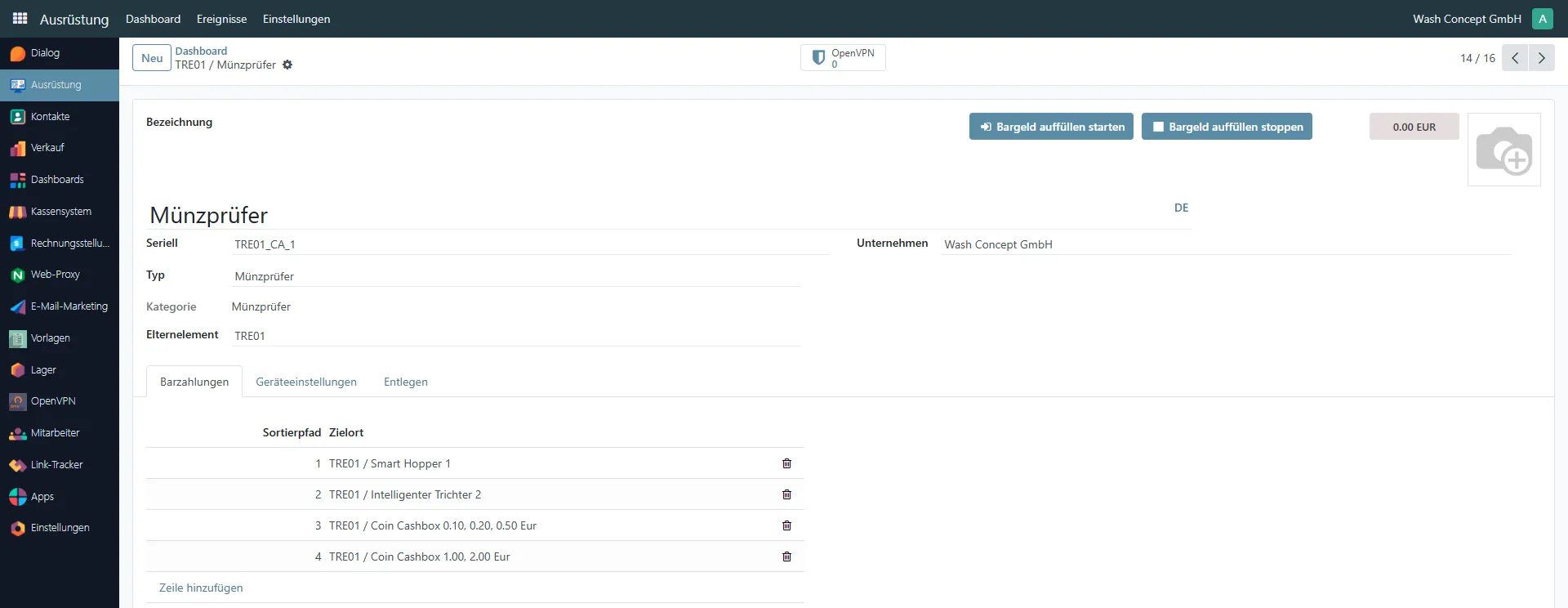
Section titled “Coin Acceptor Management”The Coin Acceptor Management page is used to configure and monitor the coin validation and routing device.
This page provides identification details, service controls, and configuration of coin sorting paths to connected devices such as smart hoppers and coin cashboxes.
You can access this page from the Equipment Items list or from the Devices Page overview of a vending unit.
Page Purpose
Section titled “Page Purpose”This page allows operators and service personnel to:
- Identify the coin acceptor device
- Monitor its association with a vending unit
- Start and stop service refill mode
- Configure coin routing paths to destination devices
- Manage connections
Header Information
Section titled “Header Information”The top section contains general device information:
- Name — device name (e.g. Coin Acceptor)
- Serial — unique serial identifier (e.g.
TRE01_CA_1) - Type — equipment type (Coin Acceptor)
- Category — equipment category
- Parent — Vending Unit controlling this device (e.g.
TRE01) - Company — owning company
On the right side the last event of the device is displayed. It`s clicable - navigate to Coin Acceptor Event List.
Service Control Buttons
Section titled “Service Control Buttons”The following service buttons are available:
- Start Cash Refill — enables refill mode for service operations
- Stop Cash Refill — disables refill mode after service is completed
Navigation Tabs
Section titled “Navigation Tabs”The page includes the following tabs:
- Cash Payments — configuration of coin routing paths
- Device Settings — device-specific configuration parameters
- Remote — remote access and connectivity options
Cash Payments Tab
Section titled “Cash Payments Tab”The Cash Payments tab defines how accepted coins are routed inside the vending system.
Sorter Path Configuration
Section titled “Sorter Path Configuration”The table contains the following columns:
- Sorter Path — internal sorting channel number
- Destination — target device where coins are routed
Each sorter path represents a physical routing line inside the coin acceptor that directs coins to a specific connected device.
Managing Sorter Paths
Section titled “Managing Sorter Paths”You can:
- Add a new routing rule using Add a line
- Remove an existing routing rule using the delete (trash) icon.