Sent Emails Monitoring
You can track all emails generated and sent from mailing lists, including their delivery status and user engagement.
How to Access
Section titled “How to Access”- Navigate to: Equipment → Settings → Mailing Lists
- Open the required mailing list
- Click Mailings

Mailings List Overview
Section titled “Mailings List Overview”The list contains all sent emails with the following fields:
- Date - date and time of sending
- Subject - email subject (generated based on events)
- Responsible - system user (e.g., ChatBot)
- Sent - number of recipients
- Delivered (%) - delivery rate
- Opened (%) - open rate
- Clicked (%) - click rate
- Replied (%) - reply rate
- Status - current state (e.g., Sent)

Email Details View
Section titled “Email Details View”By opening a specific email, you can access:
General Information
Section titled “General Information”- subject of the email
- mailing list used
- sending status
Email Content
Section titled “Email Content”- message body
- automatically generated table of equipment events, including:
- date
- equipment item
- status
- event name
- error code
- description
- duration
- tags
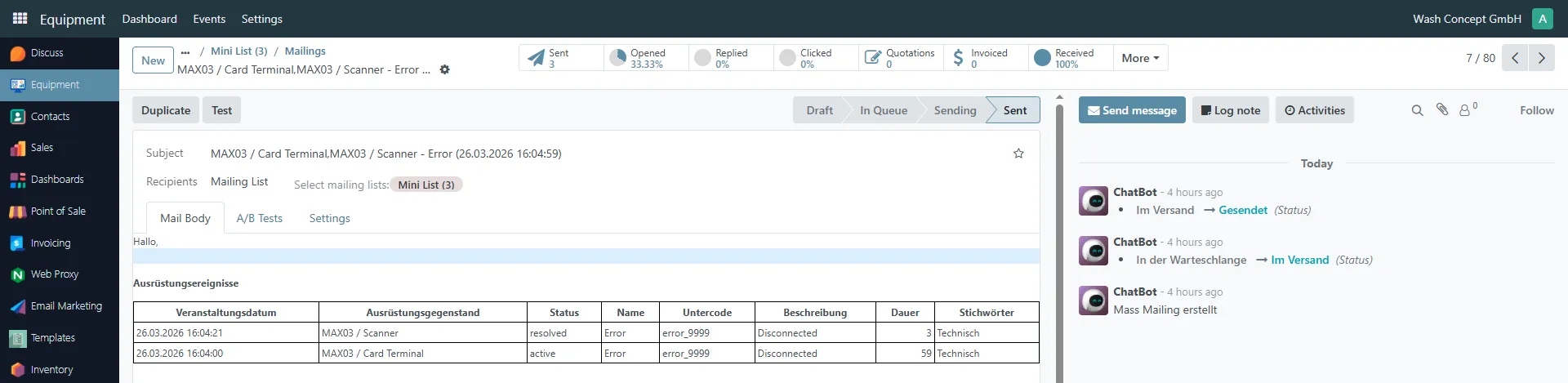
Status Flow
Section titled “Status Flow”Each email goes through the following stages:
- Draft
- In Queue
- Sending
- Sent
Activity Log
Section titled “Activity Log”On the right panel, you can track system actions:
- email creation
- status transitions
- sending process
- system-generated actions (e.g., ChatBot)
Important Notes
Section titled “Important Notes”- Each event is included in emails only once
- Duplicate notifications are not generated
- Emails are created and sent automatically via Scheduled Actions