Discount Promo Code Program
The Discount Promo Code loyalty program allows the company to create reusable promotional discount codes for customers.
Unlike the Random Discount program, promo codes are not generated automatically with a predefined probability. Instead, the promo code is created manually once and remains valid during a specified time period.
The created promo code can then be distributed to one or multiple customers, for example:
- as part of a marketing campaign
- during special promotions
- in newsletters
- on flyers
- in social media campaigns
- as compensation or customer rewards
The customer scans the QR code during payment on the vending unit and receives the configured discount.
The promo code remains valid during the configured validity period, regardless of how many times it has been used.
Opening Loyalty Programs
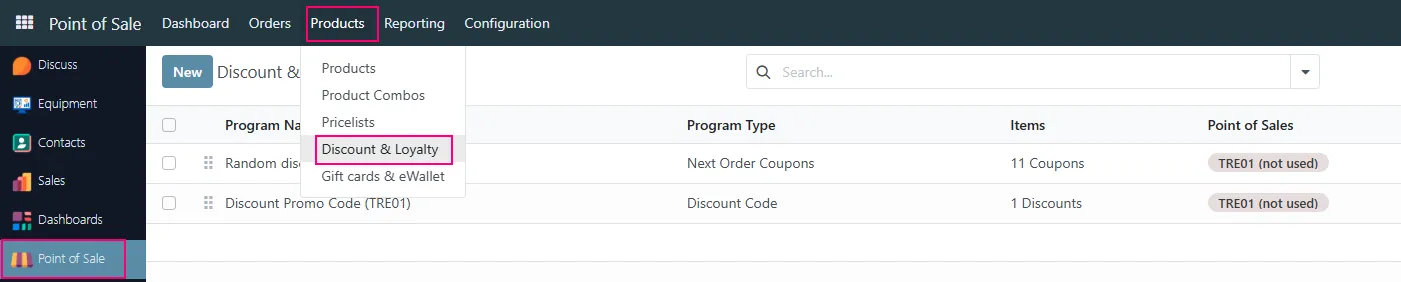
Section titled “Opening Loyalty Programs”To configure a Discount Promo Code:
- Open the Point of Sale module
- Navigate to:
- Products → Discount & Loyalty
Selecting the Program
Section titled “Selecting the Program”Open the required promo code program from the list.
Example:
- Discount Promo Code (TRE01)

Promo Code Program Configuration
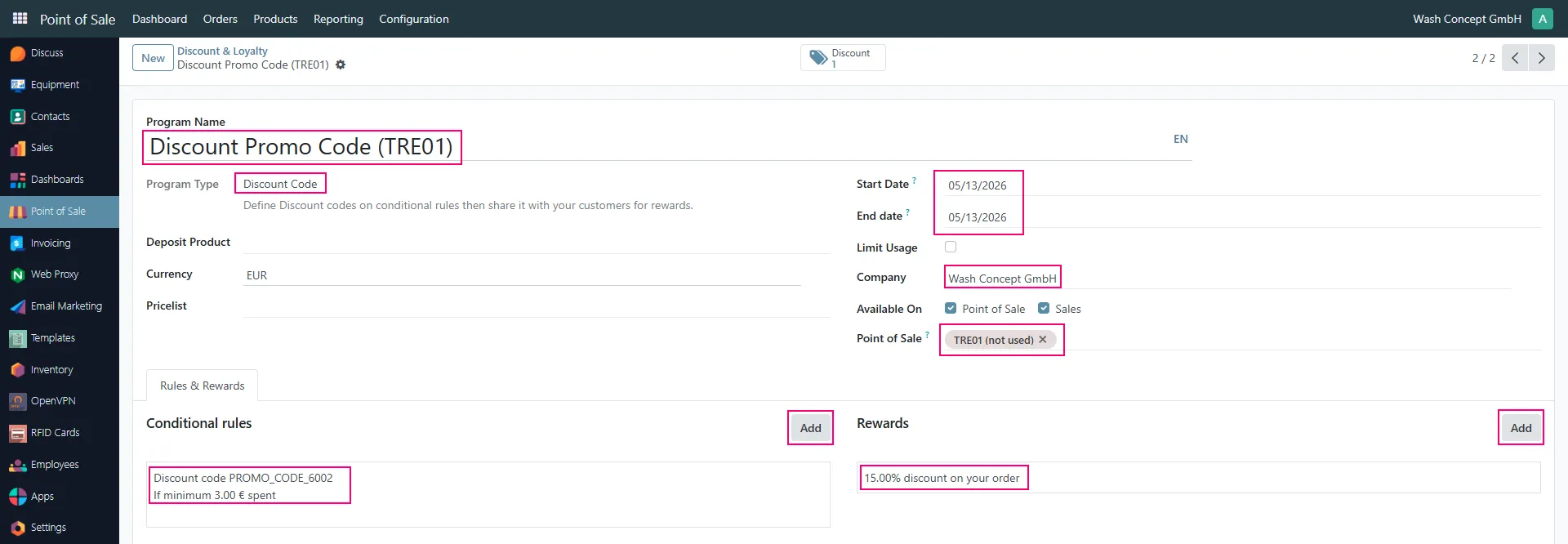
Section titled “Promo Code Program Configuration”The program configuration defines how the promo code works.
Program Type
Section titled “Program Type”The program type is:
- Discount Code
This type allows the system to create reusable promotional discount codes.
Start Date and End Date
Section titled “Start Date and End Date”These fields define the validity period of the promo code.
Example:
- Start Date: 05/13/2026
- End Date: 05/13/2026
The promo code only works within the configured period.
After the expiration date the QR code becomes invalid automatically.
Company
Section titled “Company”Defines the company that uses the loyalty program.
Point of Sale
Section titled “Point of Sale”Optionally restricts the promo code to a specific vending unit or POS.
Example:
- TRE01
Conditional Rules
Section titled “Conditional Rules”The section:
- Conditional rules
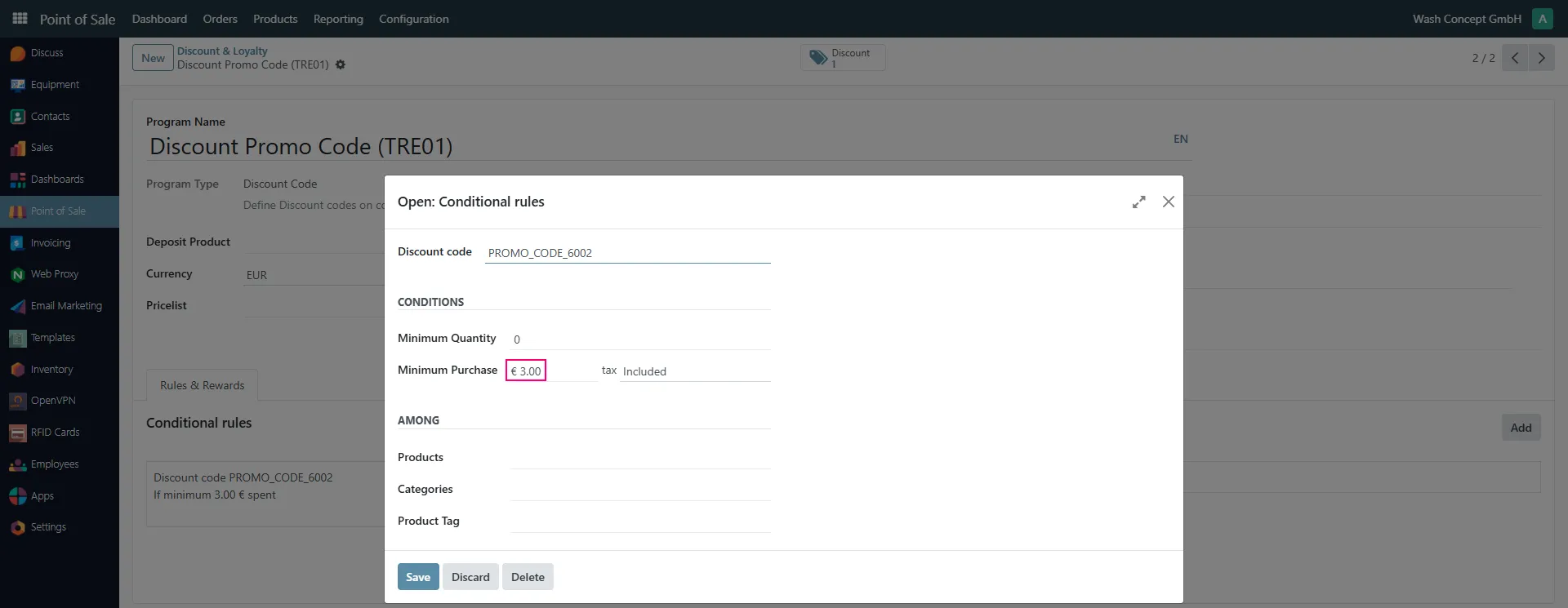
defines when the promo code discount may be applied.
Promo Code
Section titled “Promo Code”The field:
- Discount code
contains the actual promo code value.
Example:
- PROMO_CODE_6002
This code is later distributed to customers (usually in the form of a QR code).
Minimum Purchase
Section titled “Minimum Purchase”Defines the minimum order amount required for the discount to work.
Example:
- € 3.00
The customer only receives the discount if the order amount is equal to or greater than the configured value.
Minimum Quantity
Section titled “Minimum Quantity”Defines the minimum product quantity.
In the example configuration:
- 0
which means the discount depends only on the order amount.
Rewards Configuration
Section titled “Rewards Configuration”The section:
- Rewards
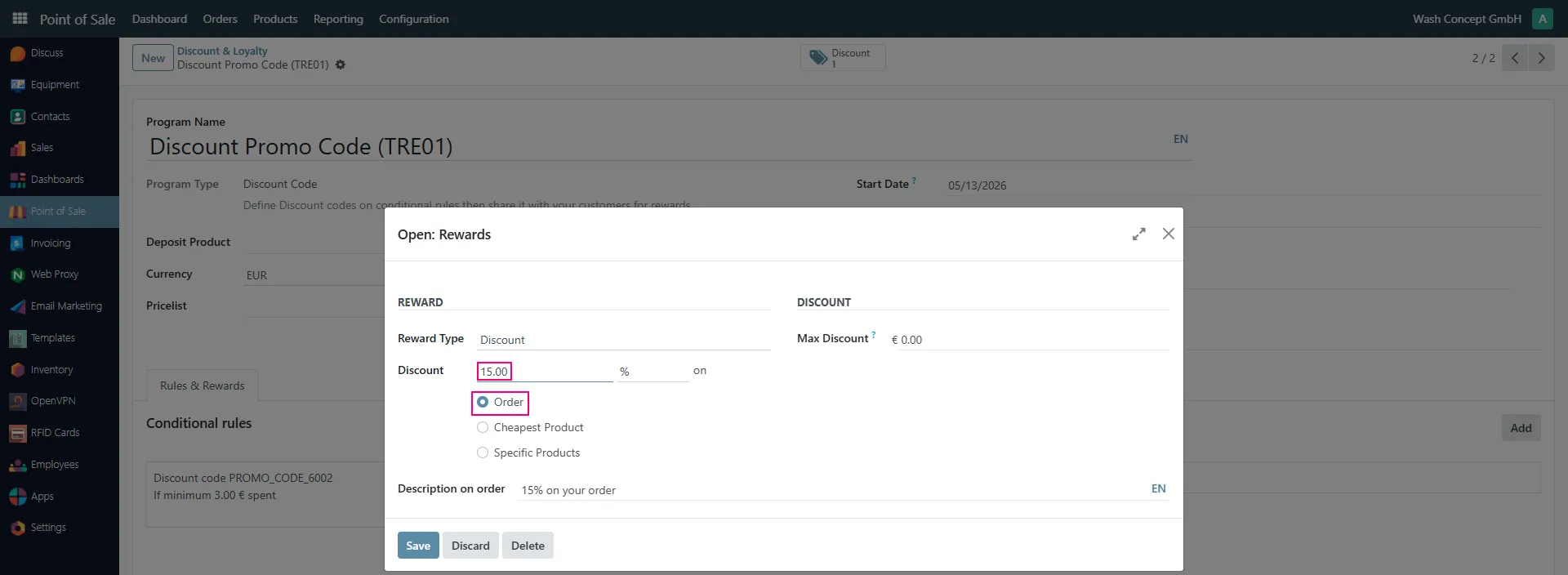
defines the discount value applied by the promo code.
Reward Type
Section titled “Reward Type”Defines the reward type.
For promo codes the type is usually:
- Discount
Discount Value
Section titled “Discount Value”Defines the discount percentage.
Example:
- 15%
Apply Discount On
Section titled “Apply Discount On”Defines how the discount is applied.
Possible options:
- Order
- Cheapest Product
- Specific Products
In the example configuration the discount is applied to the entire order.
Discount Management
Section titled “Discount Management”Created promo codes can be viewed using the:
- Discount
button.

The list contains:
- Promo code
- Balance
- Expiration date
- Program
- Customer information
Important Notes
Section titled “Important Notes”- Promo codes are created manually.
- QR codes can be distributed digitally or printed.
- The same promo code may be used by multiple customers.
- The discount becomes unavailable automatically after the expiration date.
- Multiple promo code programs can exist simultaneously.